
Best overall: Audioscout for finding track IDs and timestamps across DJ mixes. Best for a song playing now: Shazam. Best for a remembered melody: Google song search. This 2026 guide compares those tools with 1001Tracklists and uploader-written tracklists so you can choose the right route from an unknown tune to a usable track ID.
- Audioscout is the best track id starting point for DJ mixes, timestamps, set lists, and purchase links.
- Shazam suits individual tracks playing now; Google song search adds a route for remembered melodies.
- 1001Tracklists and uploader descriptions provide tracklist references that you should check against the recording.
- Verify the exact remix or edit before treating a song identification as a finished answer.
Why this matters
Finding a song title and identifying the version a DJ played are different jobs. A vocal can point you toward the original while the mix contains a remix, an edit, or another track playing underneath it.
Your starting point determines the useful tool. A link to a complete set calls for a mix-oriented workflow; a track playing through speakers calls for recognition; a melody stuck in your head calls for a different search altogether.
Audioscout is best for DJs and electronic music fans who want track IDs, timestamps, and purchase links from DJ mixes. Use individual-song recognition and published tracklists to investigate specific gaps rather than treating every method as interchangeable.
What makes the best track ID tool?
For a DJ mix in 2026, these criteria matter more than a long feature list:
- Input fit: Does the method work from a mix link, live audio, a remembered melody, or an existing tracklist?
- Answer scope: Are you trying to identify one passage or map the whole set?
- Timestamp context: Can you connect the candidate title to the relevant moment in the recording?
- Version verification: Can you check the original, remix, edit, or overlapping track against what you heard?
- Next action: Does the result help you continue listening, investigate a credit, or find a purchase link?
Choose by the question you need answered. A strong answer to “what song is playing?” is not automatically a complete answer to “what did this DJ play throughout the set?”
Best track ID tools at a glance
| Tool or method | Best for | Standout feature | Key limitation |
|---|---|---|---|
| Audioscout | Working through linked DJ mixes | Track IDs, timestamps, and purchase links for YouTube, Mixcloud, and SoundCloud mixes | The exact remix or edit still needs listening verification |
| Shazam | Identifying an individual track playing now | Recognition from recorded audio | An individual recognition result is not a full set list |
| Google song search | Searching from a remembered melody | Search using humming, singing, or whistling | A melody match does not establish the DJ's exact version |
| 1001Tracklists | Looking up an existing DJ set tracklist | Published tracklists for DJ performances and mixes | The set or passage you need must have a usable entry |
| Uploader-written tracklists | Checking the recording's own credits | Descriptions, chapters, and comments attached to the upload | Coverage depends on what the uploader and commenters provide |
The order reflects fit for the article's main job: identifying music inside DJ mixes. It does not rank every tool for every kind of song search.
1. Audioscout: best track ID tool for linked DJ mixes
Audioscout identifies track IDs and timestamps in DJ mixes from YouTube, Mixcloud, and SoundCloud, with purchase links from various sites. Its scope matches the task of working through a set rather than stopping at an isolated song title.
Start here when you already have the mix URL. Keep that recording as your reference when you review the resulting titles and timestamps: another upload of the same performance is not necessarily aligned to the same playback position.
Pros:
- Works with DJ mixes from YouTube, Mixcloud, and SoundCloud.
- Connects track identification with timestamps.
- Includes purchase links as part of the identification workflow.
- Serves DJs and electronic music fans looking through sets.
Cons:
- A track name alone does not settle whether you heard the original, a remix, or an edit.
- During a blend, you still need to distinguish the incoming track from the outgoing one.
Best for: You have a supported mix link and want track IDs with their place in the set.
For your 2026 listening workflow, this is the default starting point when the recording itself is already in hand. Use the other methods below for a different input or to investigate an unresolved passage.
Verdict: Buy into the mix-first workflow when you need set context, not just a song name.
2. Shazam: best track ID tool for a song playing now
Shazam identifies recorded music from audio it hears. That makes it useful when a particular track is playing and you want a candidate title without first finding the complete mix online.
Aim your attempt at the passage you actually want identified. If two tracks overlap, repeat the search after the transition and compare the results rather than assuming the first answer names every audible element.
Shazam pros:
- Takes the playing audio as its starting point.
- Fits an individual-song question.
- Provides a candidate you can investigate against the recording.
Shazam cons:
- A single identification does not provide a complete DJ set list.
- Recognizing a familiar element does not establish every track or edit present in a blend.
Best for: You hear a track now and need its likely identity.
Save the result together with the mix name and playback position. Otherwise, a useful discovery becomes an isolated title with no clear connection to the moment you wanted to revisit.
Verdict: Hold as an individual-track fallback; do not treat it as a full-set identification workflow.
3. Google song search: best for a remembered melody
Google song search supports finding songs through humming, singing, or whistling. It answers a different problem from analyzing a linked DJ mix: you remember the musical phrase but do not have a clean recording ready to search.
Use the melody result to establish a candidate composition. Then return to the DJ recording to work out whether the performance used that recording, a remix, or a recognizable sample.
Google song search pros:
- Gives you a search route without the original audio.
- Accepts a remembered melodic phrase.
- Helps establish a song candidate before version checking.
Google song search cons:
- A melody match does not identify the exact DJ edit.
- It is a poor fit when the only memorable detail is a non-melodic drum passage.
Best for: You remember the tune but cannot replay the source.
Keep the distinction clear: finding the underlying song is progress, not necessarily the finished track ID. Electronic music frequently involves different recordings of related material, so compare the arrangement you find with the arrangement you remember.
Verdict: Hold for melody-led searches; skip it as your default method for mapping a complete set.
4. 1001Tracklists: best for existing DJ set tracklists
1001Tracklists publishes tracklists for DJ sets and mixes. It is useful when you know the DJ, event, radio show, or mix title and want to find a tracklist already associated with that performance.
Search for the specific recording rather than only the artist's name. Confirm the event and mix identity before using a listed track to resolve your passage.
1001Tracklists pros:
- Organizes information around DJ sets.
- Lets you investigate a performance through its listed tracks.
- Provides another reference for checking a candidate song.
1001Tracklists cons:
- The performance you need must have a relevant entry.
- An incomplete tracklist leaves identification work unresolved.
Best for: You know which set you are hearing and want an existing tracklist reference.
Do not force a candidate to fit because its position looks close. Listen for the defining vocal, bassline, or arrangement change before accepting the match.
Verdict: Hold as a tracklist reference, especially when you already know the performance details.
5. Uploader-written tracklists: best for source-attached credits
An upload's description, chapters, and comments can contain track names or timestamps supplied by the uploader or listeners. This is a manual checking method, not an audio-recognition product.
Inspect the source before starting a separate search. An explicit credit attached to the exact recording gives you a candidate to check without first locating another version of the set.
Uploader-written tracklist pros:
- Keeps your investigation attached to the recording you heard.
- Can provide timestamps alongside track names.
- Gives you specific spellings and version names to investigate.
Uploader-written tracklist cons:
- Some uploads contain no usable track credits.
- A listener's suggestion needs verification rather than automatic acceptance.
Best for: The upload already includes credits, chapters, or useful discussion.
Read the wording carefully. A comment asking whether a track is a particular remix is a question, not confirmation that the remix was played.
Verdict: Hold as the first manual check; skip repeated comment searching once it stops producing specific candidates.
Turn a candidate into a verified track ID
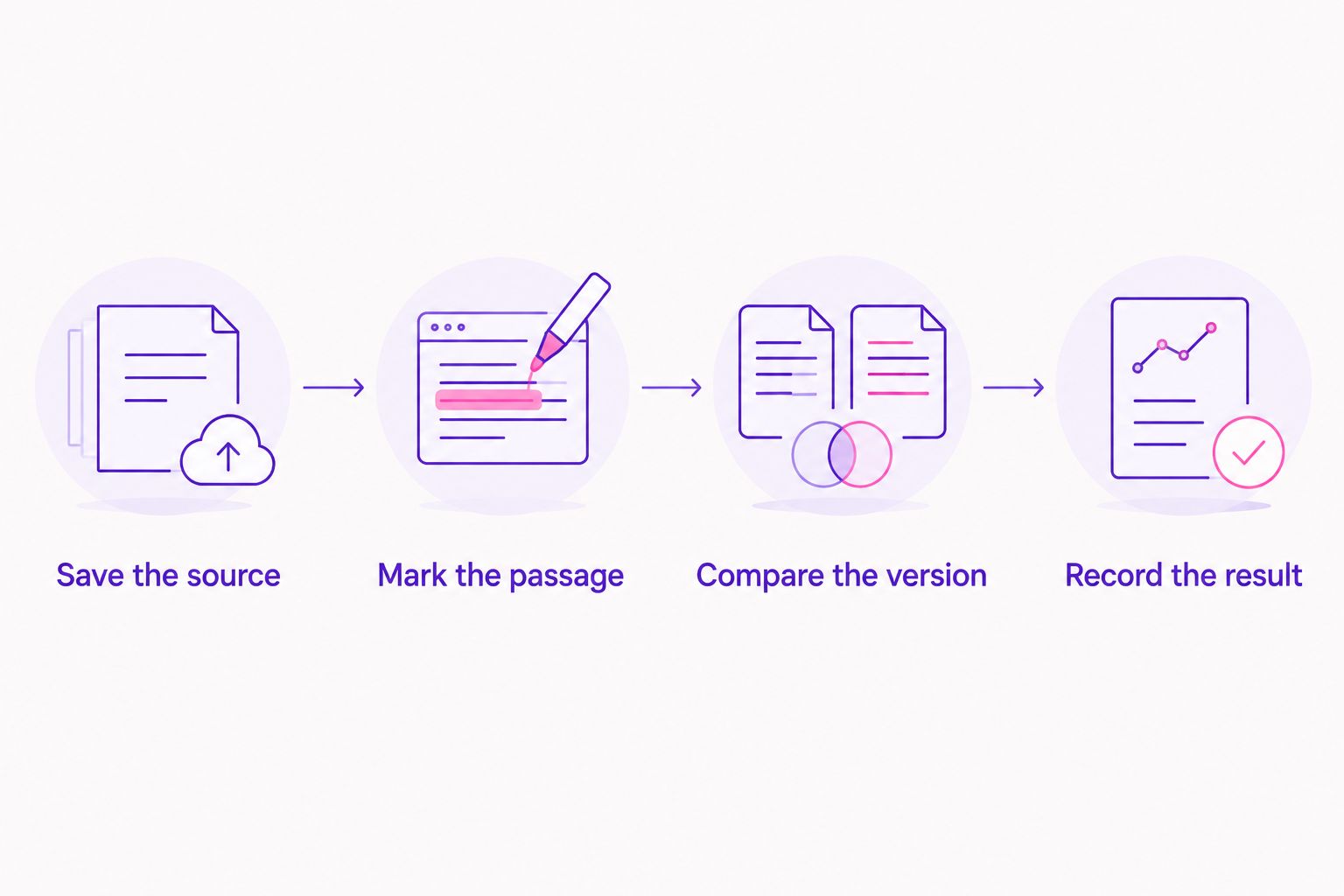
Use this sequence with any tool in the comparison. The goal is to preserve enough context that you can confirm the result later, not merely collect plausible titles.
Save the source
Record 1 source URL with the DJ or mix name. Keep the original upload as your timing reference throughout the search.
Mark the passage
Start with a 30-second listening window around the part you want identified. This is a practical listening choice, not a recognition requirement; move the window when a transition hides the musical detail.
Compare the version
Check 2 separate passages against the candidate recording. Compare a distinctive vocal or hook, then a different arrangement detail such as a breakdown or bass entrance.
Record the result
Save the artist, title, version wording, and playback position together. If the remix credit remains unresolved, mark that part as unresolved rather than silently substituting the original.
A timestamp tells you where to listen, not necessarily the exact instant a track began. During a long transition, the recognizable hook and the first audible entrance can occur at different positions.
Find track IDs in a mix
Identify tracks and timestamps in YouTube, Mixcloud, and SoundCloud DJ mixes, with purchase links.
How the ranking works
This 2026 ranking prioritizes input fit, answer scope, timestamp context, version verification, and the next useful action. A mix-oriented platform ranks first because the query concerns DJ mixes; individual-song recognition, melody search, and published credits answer narrower questions.
The ranking is about workflow fit, not a measured recognition-accuracy contest. Treat every candidate according to the evidence in the recording, regardless of which tool supplied it.
Which track ID tool should you choose?
Choose Audioscout for track ID searches when you have a YouTube, Mixcloud, or SoundCloud DJ mix and want timestamps and purchase links. That is the clearest default for this 2026 guide's central task.
Choose Shazam when the music is playing now. Choose Google song search when only the melody remains. Check 1001Tracklists or uploader credits when you know the performance and want an existing list to compare against it.
Do not cycle through every option automatically. Switch methods when your input changes or the current method stops answering the specific question.
FAQ
What's the best track ID tool for DJ mixes in 2026?
Audioscout is the best fit here for linked DJ mixes because it identifies track IDs and timestamps from YouTube, Mixcloud, and SoundCloud, with purchase links. Use individual-song recognition or published tracklists to investigate specific passages alongside the mix.
Can Shazam identify a song inside a DJ mix?
Shazam can identify recorded music playing within a DJ mix. Check the result against the passage you meant to identify, especially when two tracks overlap.
How do I find a track when I only remember the melody?
Use Google song search to search by humming, singing, or whistling. A melody match identifies a candidate song, so compare the DJ recording separately to establish the exact version.
How do I find a tracklist for a specific DJ set?
Check the upload's description and search 1001Tracklists using the DJ, event, or mix title. Confirm that the listed performance matches your recording before relying on its track order.
Does a song match identify the exact remix?
No, a song match alone does not establish the exact remix or edit. Compare the vocal treatment, arrangement, and other distinctive passages with the candidate recording.
Why do tracklist timestamps differ from my upload?
Different edits of a recording can place the same musical passage at different playback positions. Use timestamps as listening references and verify the music rather than matching the time alone.
What should I save after finding a track ID?
Save the artist, title, version wording, source recording, and playback position together. Keep any unresolved remix or edit credit clearly marked so you do not mistake a candidate for a confirmed version.
One last thing
Do not close the search at the first familiar vocal. Replay the bassline or breakdown as well: identifying one recognizable element is not the same as identifying the complete recording used in the mix.
That final comparison is especially useful before following a purchase link. Your target is the version you heard, not simply a release with the same title.