
Best overall for DJ mixes: Audioscout. Best for a recorded song playing nearby: Shazam. Best for singing or humming: SoundHound. Best for a melody remembered without lyrics: Google song search. This 2026 AI song identifier guide compares those tools by what you can submit and what you need back.
- Choose an AI song identifier by input: a DJ mix link, recorded audio, or a hummed melody.
- Shazam is the direct choice for identifying a recorded song playing nearby.
- SoundHound and Google song search support melody searches through singing or humming.
- DJ mix identification needs track IDs and timestamps, not just one song title.
Why this matters
A song playing in a café, an unfamiliar track inside a DJ set, and a melody stuck in your head are different identification problems. The right tool depends on which evidence you have.
For your 2026 shortlist, prioritize the input and the result over the AI label. A recognizable song title is useful, but a DJ also needs to know where the track appears and which recording to investigate.
What makes the best AI song identifier
Use these criteria before choosing a tool:
- Input fit: Does the tool accept your mix source, hear recorded music, or recognize a sung melody?
- Result fit: Do you need one song title or track IDs with timestamps across a mix?
- Recording detail: Can you check the suggested artist, title, and version against what you heard?
- Listening workflow: Does the tool suit a saved link, a nearby speaker, or a remembered tune?
- Next action: Can you use the result to revisit the passage, investigate the recording, or find purchase links?
No identifier wins every input type. A humming search and a DJ mix identification workflow solve different tasks, even when both end with an artist and title.
AI song identifier tools at a glance
The order below follows the use cases in the verdict. It is not a measured accuracy ranking.
| Tool | Best for | Standout feature | Key limitation |
|---|---|---|---|
| Audioscout | Identifying tracks inside linked DJ mixes | Track IDs, timestamps, and purchase links for YouTube, Mixcloud, and SoundCloud mixes | An identified title still needs checking against the exact recording |
| Shazam | Identifying recorded music playing nearby | Recognition from recorded audio | Not the right input method for humming a remembered tune |
| SoundHound | Searching by singing or humming | Melody input as well as recorded-song recognition | Your melody must provide enough information to distinguish the song |
| Google song search | Finding candidates for a tune remembered without lyrics | Hum, whistle, or sing a melody in the Google app | Melody matches do not establish the exact remix or recording |
1. Audioscout: best AI song identifier for DJ mixes
Audioscout identifies track IDs and timestamps in DJ mixes from YouTube, Mixcloud, and SoundCloud, with purchase links from various sites. Its purpose matches a listener who has a set link and wants to identify the music within it.
Audioscout is best for DJs and electronic music fans who need track IDs and timestamps from linked DJ mixes. That is a more specific task than asking a phone to name one song coming from a speaker.
Why the mix workflow matters
A DJ mix contains a sequence of tracks rather than one isolated recording. A timestamp gives you a place to return to when checking a suggested identification. Purchase links provide a next step when you want to investigate getting the track.
Keep the distinction between finding a composition and finding a recording. A familiar vocal can appear in an original, remix, edit, or mashup; the useful result is the version that matches the set.
Audioscout pros:
- Covers DJ mixes from YouTube, Mixcloud, and SoundCloud.
- Provides timestamps alongside track IDs.
- Includes purchase links from various sites.
- Serves a defined task for DJs and electronic music fans.
Audioscout cons:
- A linked-mix workflow is an extra step when you only want to identify a song playing nearby.
- Track IDs and purchase links still require an exact-version check before you choose a recording.
Best for: You have a DJ mix link and want to move from listening to identifying individual tracks.
Verdict: Buy into the mix-focused workflow when your source is a DJ set. Choose a live-listening tool instead when the only evidence is music playing in the room.
2. Shazam: best song identifier for recorded music nearby
Shazam identifies recorded music it hears. Use it when a song is playing from a speaker, television, or another audio source and you want an artist and title.
Shazam is the straightforward starting point for this input. You do not need to reproduce the melody yourself; you need a recognizable passage of the recording.
Where Shazam fits
Use Shazam while the music is still playing. If the result seems wrong, check another distinct passage rather than treating the first match as final.
For a DJ set, the question is narrower: can Shazam identify the recording audible at that moment? That does not replace a workflow built around timestamps and multiple tracks across a linked mix.
Shazam pros:
- Accepts the recorded music itself as evidence.
- Suits spontaneous identification while a song is playing.
- Removes the need to remember lyrics or sing a melody.
Shazam cons:
- Humming is not a substitute for the recorded-audio input Shazam expects.
- An overlapping DJ transition complicates checking which audible track a result identifies.
Best for: You can hear the original recording now and want to identify that song.
Verdict: Buy into Shazam for live recorded-song recognition. Skip it as your first choice when all you have is a melody in your head.
3. SoundHound: best song identifier for singing or humming
SoundHound supports song identification from recorded music and from singing or humming. It belongs on your shortlist when you remember how a tune goes but cannot replay the recording.
The useful distinction is input flexibility. You can supply your own rendition of the melody instead of waiting to hear the song again.
Make your melody recognizable
Sing or hum the phrase you remember most clearly. A distinctive melodic line gives the search a better basis than a vague rhythm or a spoken description of the song.
Check the returned candidate against your memory of the chorus, vocal, and arrangement. Recognizing the melody does not confirm that the result is the same live version, remix, or cover you originally heard.
SoundHound pros:
- Accepts singing and humming.
- Also supports recognition of recorded music.
- Gives you a search route when the original audio is unavailable to you.
SoundHound cons:
- A poorly remembered melody gives the search less useful evidence.
- A melody match still needs checking against the recording you want.
Best for: You remember a singable phrase and want a tool that also handles recorded-song recognition.
Verdict: Buy into SoundHound when you can reproduce the tune. Skip repeated attempts at a vague fragment; first recover a clearer phrase.
4. Google song search: best for a tune without remembered lyrics
Google song search in the Google app accepts humming, whistling, and singing to help find a song. Use it when you remember the tune but not enough words to run a useful lyric search.
Google song search earns a separate place here for the melody-first lookup. Treat its suggestions as candidates to compare, not as proof of the precise recording.
Compare the tune, then the version
Start with the melodic passage you can repeat consistently. When a candidate sounds familiar, listen for the part you remember rather than accepting the title alone.
This matters when a familiar melody appears in several recordings. Finding the underlying song is progress, but it does not settle which edit appeared in a DJ set.
Google song search pros:
- Accepts humming, whistling, or singing.
- Does not require remembered lyrics for a melody search.
- Provides a route from a remembered tune to song candidates.
Google song search cons:
- The search depends on the melody you can supply.
- A tune match does not identify the exact remix or edit by itself.
Best for: You remember the melody, lack the lyrics, and want to search through the Google app.
Verdict: Buy into Google song search for melody-led discovery. Skip it as a substitute for identifying individual recordings throughout a DJ mix.
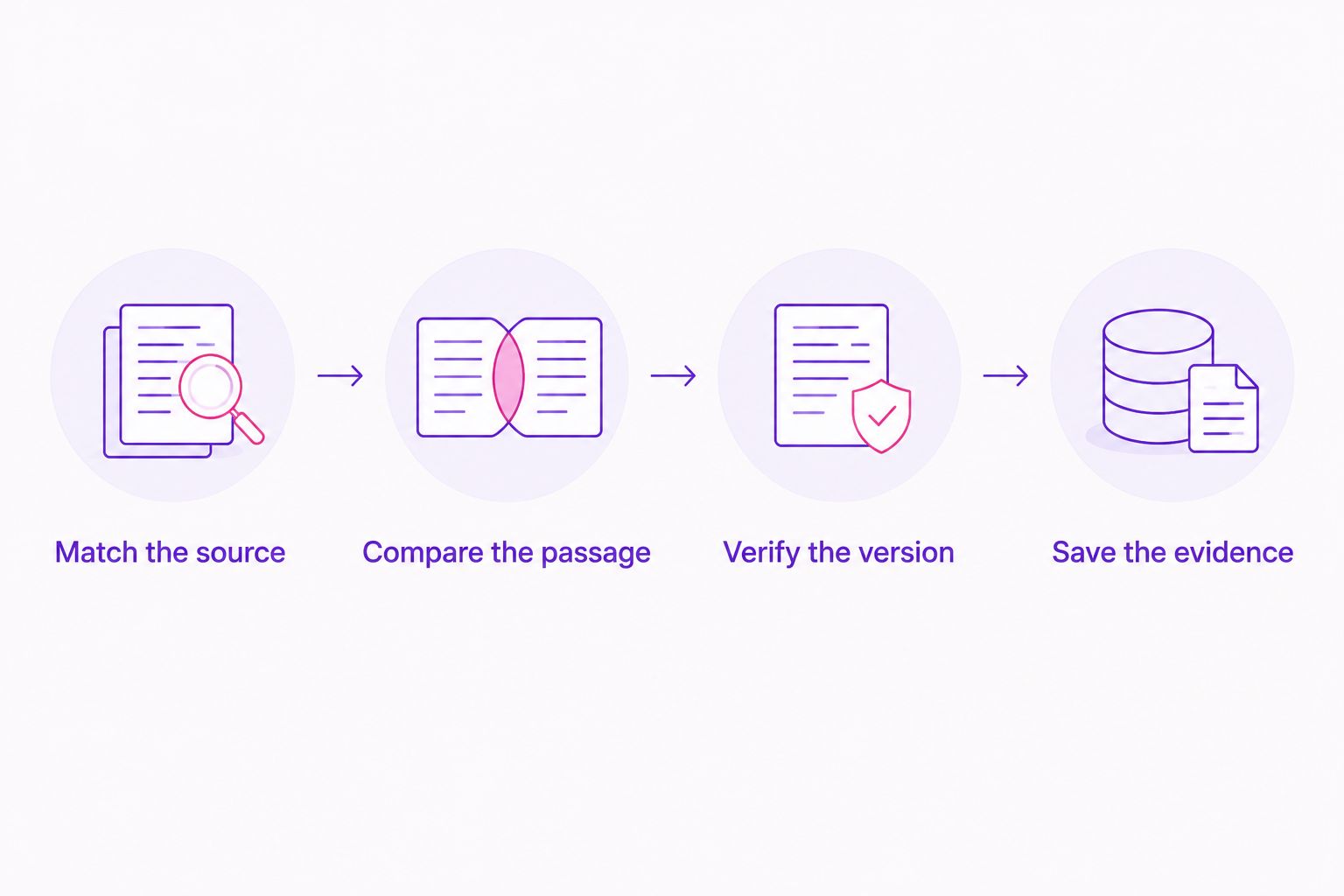
How to check a song identification
A useful identification must survive a listening check. In 2026, use this same process whether the suggestion comes from a mix identifier, Shazam, SoundHound, or Google song search.
Match the source
Keep the source recording or mix open while checking the result. For a DJ set, return to the relevant timestamp rather than comparing the candidate against your memory of the whole performance.
Compare the passage
Listen for a distinctive vocal, lead melody, bass line, or drum pattern. During a transition, compare a passage where the track you want is easier to hear.
Verify the version
Read the complete recording title, including any remix, edit, or live designation. Then compare the audio. Matching artist names and a familiar hook are not enough to establish the version.
Save the evidence
Record the source, timestamp, artist, title, and version together. That makes the result useful when you return to the track later or investigate a purchase link.
How we ranked these song identifiers
This 2026 guide ranks by task fit: input, result, recording detail, listening workflow, and next action. The comparison separates linked DJ mixes, recorded music, and remembered melodies rather than assigning an unsupported accuracy score.
The first position reflects the article's DJ mix use case. Shazam is the stronger fit for nearby recorded audio; SoundHound and Google song search address melodies you reproduce yourself.
Use the limitations as selection criteria, not footnotes. If you have no recording to play, recorded-audio recognition is the wrong starting point. If you need timestamps across a mix, a single song candidate does not finish the job.
Which AI song identifier should you choose?
Choose Audioscout for DJ mix identification when your source is a YouTube, Mixcloud, or SoundCloud mix. Track IDs, timestamps, and purchase links match that workflow.
Choose Shazam for a recorded song playing nearby. Choose SoundHound when you want to sing or hum a tune, or Google song search when you want melody candidates through the Google app.
For your 2026 setup, start with the tool that accepts the evidence you already have. Add another only when it solves a different input problem; four tools performing the same lookup do not replace an exact-version check.
FAQ
What's the best AI song identifier for a DJ mix?
Audioscout is the best fit in this guide for linked DJ mixes from YouTube, Mixcloud, and SoundCloud. It identifies track IDs and timestamps and provides purchase links from various sites.
What's the best song identifier when music is playing nearby?
Shazam is the direct choice in this guide for recorded music playing nearby. Let it hear a recognizable passage, then check the suggested recording against the audio.
Can I identify a song by humming it?
SoundHound and Google song search support humming as an input. Use a melodic phrase you remember clearly, then compare the suggested song with your memory.
Is Shazam better than SoundHound?
Shazam is the better fit here for a recorded song playing nearby; SoundHound is the better fit when you need to sing or hum. Choose by input rather than assuming one tool wins every task.
Can Google identify a song if I don't know the lyrics?
Google song search accepts humming, whistling, and singing in the Google app. You can search from the melody without supplying lyrics.
Will a song identifier find the exact remix from a DJ set?
A song identification alone does not establish the exact remix. Compare the suggested recording with the set passage, including the arrangement and any remix or edit designation.
What should I do if a song identifier gives the wrong result?
Try a clearer, more distinctive passage and check the next result against the source. In a DJ transition, listen for a section where the track you want is easier to distinguish.
One last thing
A correct song title can still point to the wrong recording. Before adding a discovery to your DJ library, compare the candidate against the actual passage that caught your attention.
Keep the timestamp with the title. That small record turns a promising identification into something you can verify again, especially when the same vocal or melody appears in several versions.