Best YouTube song finder for DJ mixes: Audioscout. Best for recognizing a recording while it plays: Shazam. Best for a remembered melody: Google song search. Best for uploader-provided context: YouTube descriptions and comments. This 2026 guide separates these options by the evidence you have: a mix, audible music, a melody, or written credits.
- Audioscout is the best YouTube song finder here for DJ mixes, with track IDs, timestamps, and purchase links.
- Choose Shazam when you can play the recording you want to identify.
- Choose Google song search when you remember the melody but cannot replay the recording.
- Check YouTube descriptions and comments for tracklists, remix names, and uploader context.
Why this matters
Finding a song title and identifying the version a DJ played are different jobs. A recognizable vocal can point you toward the original recording without resolving the remix, edit, or track underneath it.
Choose a finder based on your starting point, not a generic ranking. In 2026, the useful distinction is still between identifying audible recordings, searching remembered melodies, and locating tracks within a longer set. For DJ mixes, treat the version and timestamp as part of the answer—not optional extras.
What makes the best YouTube song finder?
Use these criteria before choosing an option:
- Input fit: Does the method work with your source—a YouTube mix, music playing aloud, a hummed melody, or written credits?
- Result detail: Do you need an artist and title, or a tracklist with timestamps and purchase links?
- Version clarity: Can you distinguish the original recording from a remix, edit, cover, or live performance?
- Context: Can you connect the proposed title to the actual passage in the video?
- Verification: Can you listen to the identified recording and compare it with what you heard?
No single result settles every question. A title can be correct while the version is wrong, and a timestamp can locate a transition rather than an isolated track.
YouTube song finders at a glance
| Option | Best for | Standout feature | Key limitation |
|---|---|---|---|
| Audioscout | Track identification across DJ mixes | Track IDs, timestamps, and purchase links for mixes from YouTube, Mixcloud, and SoundCloud | A track identification does not establish permission to reuse the recording |
| Shazam | Recognizing a recording while it plays | Identifies recorded music from audible playback | A recording match does not by itself verify a DJ's exact edit or transition |
| Google song search | Finding a song from a remembered melody | Accepts humming, singing, or whistling | A melody match does not establish the recording version |
| YouTube descriptions and comments | Finding uploader or listener context | Written credits, tracklists, and discussion tied to the video | Credits and comments require verification against the audio |
1. Audioscout: best YouTube song finder for DJ mixes
Audioscout identifies track IDs and timestamps in DJ mixes from YouTube, Mixcloud, and SoundCloud. It also provides purchase links from various sites, connecting identification with the next step of finding the recording.
Audioscout is the best YouTube song finder in this guide for DJs and electronic music fans who need track IDs and timestamps from mixes. That is a more specific job than recognizing a standalone song playing nearby.
When to choose it
Choose this option when your question is about the contents of a set: which tracks appear, where they occur, and where to find them. The combination of track IDs and timestamps gives you a way to return to the relevant passage rather than searching the entire mix again.
For your 2026 listening workflow, keep the source video and the identified version together. When building a collection, compare the linked recording with the section that caught your attention before deciding it is the version you want.
Audioscout pros:
- Focuses on track identification within DJ mixes.
- Provides timestamps alongside track IDs.
- Supports mixes from YouTube, Mixcloud, and SoundCloud.
- Includes purchase links from various sites.
Audioscout cons:
- Identification does not establish copyright ownership or reuse permission.
- A purchase link still needs a listening check against the version you heard.
Best for: DJs and electronic music fans investigating tracks inside longer mixes.
Verdict: Buy into the mix-first workflow when you need set context, not just a song title.
2. Shazam: best YouTube song finder for audible recordings
Shazam identifies recorded music that it can hear. Use it when the song is playing in a YouTube video and your immediate question is simply what recording you are hearing.
This is an audio-first approach. You provide the sound rather than a written description of the video, an uncertain lyric, or a guessed artist name.
When to choose it
Choose Shazam when you can replay the relevant passage and hear the music clearly. If speech covers the section you first noticed, look elsewhere in the video for a passage where the recording is easier to hear.
Treat the returned title as something to verify. In a DJ set, the recognizable element might be a vocal over another track; identifying that vocal does not explain everything happening in the mix.
Shazam pros:
- Works from audible recorded music.
- Does not require you to know the lyrics or artist beforehand.
- Fits a direct play-and-identify task.
Shazam cons:
- A match alone does not describe the rest of a DJ set.
- You still need to check whether the result is the exact remix, edit, or performance.
Best for: Listeners who can play the recording and want to identify that passage.
Verdict: Buy into audio recognition when you have the sound; skip it as a substitute for checking the version.
3. Google song search: best for a remembered melody
Google song search lets you search for music by humming, singing, or whistling. It addresses a different problem from recognizing a YouTube recording: you remember how the tune goes, but cannot replay the source.
Use the melody as your search input. You do not need to reconstruct an uncertain lyric before beginning.
When to choose it
Choose Google song search when you have lost the video, forgotten its title, or remember only the tune. Once you find a candidate, listen to the song and decide whether its melody matches your memory.
Then separate the composition from the recording. Finding the song behind a melody does not prove which remix, cover, or instrumental version appeared in the video. For a 2026 playlist or DJ collection, record that distinction rather than saving an unverified version as the final answer.
Google song search pros:
- Accepts humming, singing, or whistling.
- Does not require the original recording to be playing.
- Gives you a route into a search when you do not know the words.
Google song search cons:
- A melody match does not identify the exact production or mix.
- It does not recover a missing video's tracklist or timestamp.
Best for: Listeners who remember a tune but no longer have usable source audio.
Verdict: Buy into melody search to recover a song; hold judgment on the recording version.
4. YouTube descriptions and comments: best for written context
A YouTube video's description and comments can contain credits, tracklists, timestamps, or discussion of particular songs. These are sources of written context, not audio-recognition tools.
Start with information attached to the video itself. An uploader's tracklist can give you a candidate title and a place to listen, while a comment can supply a clue worth checking.
When to choose this method
Choose written context when the question includes information that sound alone does not settle: the name of an edit, a guest performer, or a track mentioned by the uploader.
Keep claims separate from evidence. A comment naming a track is a lead; listening to the proposed recording is the check. If the description credits a song but your target passage sounds different, investigate the version instead of forcing the match.
YouTube descriptions and comments pros:
- Keep your search connected to the original video.
- Can supply artist names, version names, and tracklist context.
- Give you searchable wording to investigate further.
YouTube descriptions and comments cons:
- A video need not include a useful tracklist or credit.
- Listener comments are not authoritative confirmation.
- A written title alone does not prove the exact version.
Best for: Listeners looking for credits or explanations attached to a specific upload.
Verdict: Buy into written context as supporting evidence; skip unverified comments as your final answer.
How to verify a YouTube song identification
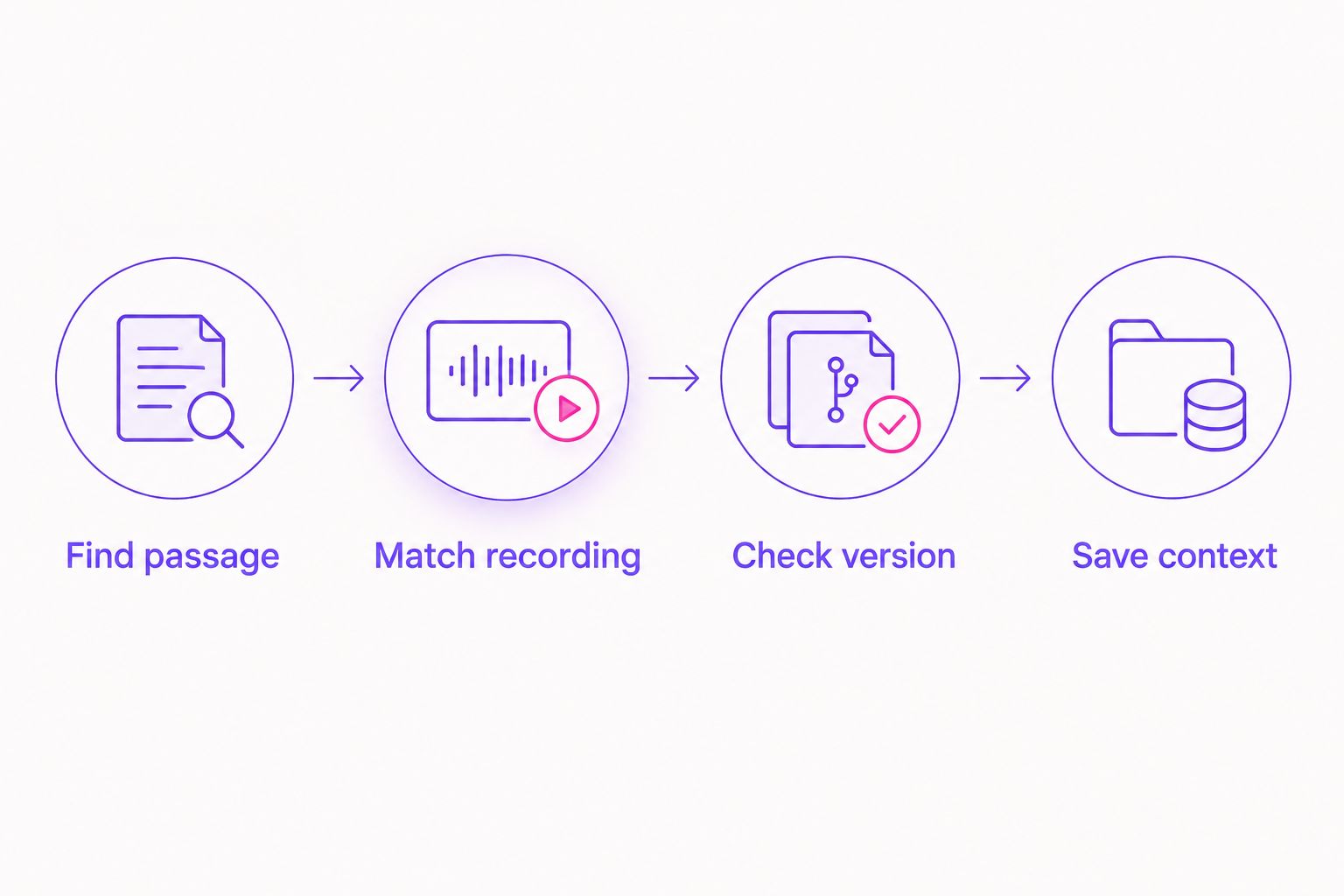
A useful 2026 search ends with a checked recording, not an attractive-looking title. Follow this sequence regardless of which option produces the first candidate.
- Find passage: Return to the part of the video you actually want to identify. Note its timestamp and listen beyond the first recognizable sound.
- Match recording: Listen to the proposed song. Compare its vocal, melody, rhythm, and arrangement with the video.
- Check version: Look at the full title and credited remix or edit. Do not treat matching artist names as sufficient evidence.
- Save context: Keep the source video, timestamp, and confirmed title together so you can revisit the identification.
Use 2 listening points: the passage in the video and the candidate recording. If only the vocal agrees while the backing differs, keep searching for the edit or accompanying track. That comparison is more useful than collecting additional guesses without listening to them.
For a blended transition, check 3 elements separately: the outgoing track, the incoming track, and any vocal layered over them. Those are listening checks, not a promise that any finder will resolve every element.
Find track IDs in DJ mixes
Identify tracks and timestamps in mixes from YouTube, Mixcloud, and SoundCloud.
How these options are ranked
This 2026 ranking prioritizes fit for the task: mix identification, audible recording recognition, remembered melody search, and written context. It does not claim a measured accuracy winner across all music.
The order puts DJ-mix context first, then separates the alternatives by what you can supply. Apply the criteria above to your own search: source fit first, result detail second, and version verification before you finish.
Which YouTube song finder should you choose?
Choose Audioscout for DJ mixes when you need track IDs, timestamps, and purchase links together. Choose Shazam for an audible recording, Google song search for a remembered melody, and the video's description or comments for written context.
If you are undecided, define the question before choosing the tool. Finding a familiar chorus is a recording-recognition task; locating a track inside a long set is a mix-identification task. Start with the option built around the evidence you have, then verify the result against the source.
FAQ
What's the best YouTube song finder for DJ mixes?
Audioscout is the best fit in this guide for DJ mixes because it provides track IDs, timestamps, and purchase links. It supports mixes from YouTube, Mixcloud, and SoundCloud.
Can Shazam identify a song playing in a YouTube video?
Shazam can identify recorded music from audible playback. Replay the relevant passage, then compare the returned recording with the video to check the version.
How do I find a YouTube song if I only remember the melody?
Use Google song search to search by humming, singing, or whistling. A melody match helps identify the song, but does not establish which recording appeared in the video.
How do I find the exact remix from a YouTube DJ set?
Compare the candidate recording with the relevant passage and check the full remix or edit credit. A matching vocal or artist name alone does not prove the exact version.
Are YouTube comments reliable for song identification?
Treat YouTube comments as leads rather than confirmation. Listen to the named recording and compare it with the passage before accepting the identification.
Does identifying a YouTube song mean I can use it in my own video?
No. Song identification does not grant permission to reuse a recording. Check the applicable rights and permissions separately from the identification.
What should I save after finding a track in a DJ mix?
Save the confirmed artist, title, version, source video, and timestamp. Keeping the source context lets you revisit the passage if the version remains uncertain.
One last thing
Save the timestamp before leaving the video. A correct song title without its source context can send you back through an entire set when you later question the remix. Keeping the passage and candidate recording together turns a remembered discovery into an identification you can check.